Thursday, September 7, 2017

Expanding extended partitions (or how to increase the space when I clone an SD to a larger one?)

I cloned an SD running raspbian from a 16GB to a 32GB one. The clone worked perfectly, however, the new card had a 13GB partition (missing out on the new space!)
The answer: fdisk.
Procedure should be to delete both partitions and then to recreate them with exact same starting sectors.

Key things to remember:
- use "-c=dos" to run legacy mode in disk
- create all logical exactly like it was before. Use expert mode to guarantee it starts in same sector.

$ sudo fdisk -l /dev/mmcblk0 -c=dos

Welcome to fdisk (util-linux 2.27.1).
Changes will remain in memory only, until you decide to write them.
Be careful before using the write command.


Command (m for help): p
Disk /dev/sda: 28.8 GiB, 30908350464 bytes, 60367872 sectors
Units: sectors of 1 * 512 = 512 bytes
Sector size (logical/physical): 512 bytes / 512 bytes
I/O size (minimum/optimal): 512 bytes / 512 bytes
Disklabel type: dos
Disk identifier: 0x000ec4fb

Device     Boot   Start      End  Sectors  Size Id Type
(( make sure to do a print screen of your partitions, and the start/end sectors))

Command (m for help): d
Partition number (1,2,5, default 5): 2

Partition 2 has been deleted.

Command (m for help): n
Partition type
   p   primary (1 primary, 0 extended, 3 free)
   e   extended (container for logical partitions)
Select (default p): e
Partition number (2-4, default 2):
First sector (999424-20479999, default 999424): make sure to use what it was before
Last sector, +sectors or +size{K,M,G,T,P} (1001470-20479999, default 20479999):

Created a new partition 2 of type 'Extended' and of size 27.3 GiB.

Command (m for help): n
All space for primary partitions is in use.
Adding logical partition 5
First sector (1003518-20479999, default 1003520):
Last sector, +sectors or +size{K,M,G,T,P} (1003520-20479999, default 20479999):

Created a new partition 5 of type 'Linux' and of size 9.3 GiB.

Command (m for help): x


Expert command (m for help): b
Partition number (1,2,5, default 5):
New beginning of data (1001471-20479999, default 1003520): 1001472

Expert command (m for help): r

Command (m for help): w
Now that you have room for a bigger file system, you must clean and then grow the existing file system that has been displaced by the changing boundaries of its partition. Remember to use the correct device designation.

In this example, I use mmcblk0p2 to represent Partition 2 on an internal SD card slot, but yours may differ.

 $ sudo e2fsck -f /dev/mmcblk0p2

Then resize:

 $ sudo resize2fs /dev/mmcblk0p2

Sunday, August 6, 2017

Downloading large files from a server running only SSH/SCP

Another one to add to the eternal bucket of "great simple commands to keep in mind"

$ rsync --partial --progress --rsh=ssh --archive user@host:/PATH/TO/SOURCE /PATH/TO/DESTINATION

It will even show a nice progress bar ;)

Additionally, assuming you have a bunch of  folders you want to transfer, but they each have thousands of little files. . .

$ find . -type d -maxdepth 1 -mindepth 1 -exec tar cvf {}.tar {}  \;
$ find ./*.tar -exec gzip -S .gz -9 {}  \;

Then you can adjust your rsync to download all .gz files

Thursday, January 26, 2017

How to generate a Dockerfile from an image?

So easy, it hurts:

$ docker pull image/I/Want/To/Inspect 
$ docker history --no-trunc image/I/Want/To/Inspect

Done

Monday, July 6, 2015

How to deal with 'no space left on device' error when using Docker on OS X

When time is money, sometimes starting from scratch is way more efficient than trying to salvage your data. Recently I got the famous 'no space left on device' when trying to build a container with python, maven and boost. I found this, but immediately imagined the amount of time/effort, and weighed out that it was not worth it.

If you are like me, then you already use Docker as a temporary system, so rebuilding images is not a big deal. In that case, I suggest you do the following:

Add the following to ~/.boot2docker/profile:

# Disk image size in MB 
DiskSize = 40000

This will increase your boot2docker VM to 40GB.

What next? Easy: you destroy everything and start from scratch.

boot2docker stop 
boot2docker destroy 
boot2docker init 
boot2docker start

Thursday, August 7, 2014

On building websites: Comparing Scala/Play vs GO

I just pushed code to <https://github.com/talmai/gemawebsite> where I have the very same website coded to run on Scala 2.9.2  + Play 2.0.2, and on Go 1.3. Both code work, and generate the same output (checkout www.gemaestudio.com).

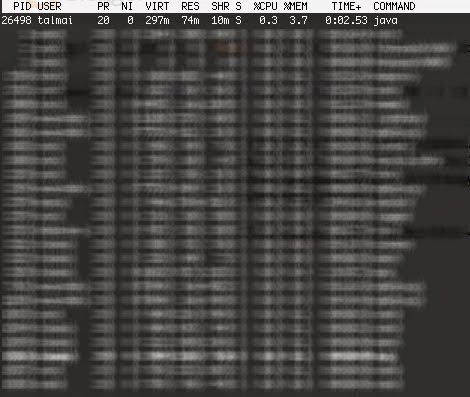
As of today, when given an option, I will choose Go over Scala anyday. The code speaks for itself. But out of curiosity, I took a look at memory and cpu requirements... (screenshots below are from the 'top' command).

VIRT stands for the virtual size of a process. In a nutshell we are talking about the sum of memory it is actually using (memory it has mapped into itself, shared libraries, and memory shared with other processes). VIRT represents how much memory the program is able to access at the present moment.

RES stands for the resident size, which is an accurate representation of how much actual physical memory a process is consuming. (This also corresponds directly to the %MEM column.) 

Scala uses 74MB of RAM (RES), but 297MB for VIRT. 


Go, as expected, uses only 5.4MB of RAM (UPDATE: to be honest, it's more like 3.8MB), but has mapped 828MB (VIRT). This I didn't expect.


Anyhow... it was fun while it lasted. The awesome part is knowing how much more RAM I got freed up on my box after this exercise. ;)

Thursday, October 17, 2013

How to combine multiple worksheets into one in Excel? (using vba)

I have several excel workbooks (.xls files) and each workbook contains multiple worksheets. The number of worksheets (as well as their names) are not constant. Each worksheet is formatted in the same way (i.e: same header). Now I want to copy all the data on each worksheet and copy it into a single worksheet. 

Launch an Excel file that you want to combine other workbooks into. Click Developer > Visual Basic, a new Microsoft Visual Basic for applications window will be displayed, click Insert > Module, and input the following code into the Module. 

Oh, and before that, create a sheet called "Summary" where we will collect the info.


Sub SummarizeSheets()
    Dim ws As Worksheet
    Application.ScreenUpdating = False
    Sheets("Summary").Activate
    Path = "C:\path\to\your\files\"
    Filename = Dir(Path & "*.xls")
    Do While Filename <> ""
        Workbooks.Open Filename:=Path & Filename, ReadOnly:=True
            For Each Sheet In ActiveWorkbook.Sheets
                For Each ws In Worksheets
                    If ws.Name <> "Summary" Then
                        ws.Range("A01:AX201").Copy
                        ActiveSheet.Paste Range("A65536").End(xlUp).Offset(1, 0)
                    End If
                Next ws
            Next Sheet
        Workbooks(Filename).Close
        Filename = Dir()
    Loop
End Sub
Then click doc-merge-multiple-workbooks-button button to run the code, and all of the worksheets (including the blank worksheets) within the workbooks have been merged into the master workbook.

References: http://www.extendoffice.com/documents/excel/456-combine-multiple-workbooks.html

Sunday, July 21, 2013

bit-for-bit copy of DVD on osX (or: how to generate .iso on mac)

0) Insert DVD
1) Open up terminal
2) Find out where it was mounted (diskutil list)
3) unmount it (sudo umount /dev/disk1)
4) generate .iso (dd if=/dev/disk1 of=~/dvdImage.iso bs=2048 conv=sync,notrunc)

Monday, August 6, 2012

How to install django-celery in windows (python, django, celery, erlang, rabbitmq)

A project of mine goes through a realistic simulation that doesn't take too long (15 seconds), but that, unfortunately is about 15 seconds too long. So I had to find a workaround for it. Threads was the first thing that came to mind, but Python is worthless for this....

Anyhow, let's get straight to the point:

***************************************
Install erlang
Install RabbitMQ


pip install kombu
pip install celery
pip install django-celery

the above commands might cause errors for sub-installation of kombu and billiard. If this occurs:

install MinGQ
in the directory for billiard (ex: C:\Users\YOUR_USER_NAME\build\billiard)
run: setup.py install build --compiler=mingw32

then rerun:

pip install kombu
pip install celery
pip install django-celery

then update settings.py according to following link and run SyncDB:
***************************************

Credits: I have Dan (http://www.linkedin.com/pub/dan-ziembienski/17/720/679) to thank for this.

Monday, July 2, 2012

Scala 2.9.2, Play! 2.0.2, and Amazon EC2

Summary: I describe how to setup a domain on amazon's EC2 (using my personal named server), and the tricks on getting scala + play (2.0.2) to run on a micro instance.

---

Introduction: So recently I got an iphone and while out and about, I wanted to look at the source code of a page on safari. It so happens that I can't do that. (Yes, I know, I took it for granted.) So while there are some apps out there, I refuse to buy an app that I'll use only once. As a matter of luck, it so happened that this weekend there was a "$.99 .com" sale, so I hastily grabbed "www.seesster.com", and considered building a site that "sees what your browser sees".

It so happens that I've been been reading about Scala as well as the Play framework, and Friday night started to code seesster up. I won't go into details of the Scala/Play code and what I'm doing (long story short: scala + phantomjs + pygments), but I will describe how I was able to set this up (running!) on my free amazon EC2 micro instance.

DNS and sub-domains: So when I login to my AWS management console, there are two things that need to be done:

1) I need to name my instance with the exact subdomain I am planning on redirecting the service to. In this case, I've named the instance www.seesster.com

2) I also need to jot down the Public DNS (which I'll use for the CNAME entry of my named config file). In this case, it is ec2-174-129-174-216.compute-1.amazonaws.com

I've highlighted the entries I'm talking about in red....
Next up, I need to update the config file. While I won't show you the whole file, as long as you know *anything* about setting up your own DNS server, this should suffice... In a nutshell, we need to setup a CNAME entry that points to the public DNS. Note the "." after the url string.

www    CNAME    ec2-174-129-174-216.compute-1.amazonaws.com.


At this point, when I tried "www.seesster.com" I would correctly end up on amazon's server. However, this was the easiest part of my weekend.

Play won't run: My coding environment has plenty of memory, so I never thought once on how this could impact me. That is, until I tried to run play on it... "play run", "play dist", "play start" and even "play compile" would end up with memory allocation problems. I was between a rock and a hard place.

Solving this involved:

1) Manually downloading and installing java 1.7 (jdk1.7.0_05).
2) Updating the symbolic links:

$ ll /usr/lib/jvm/jre
lrwxrwxrwx 1 root root 31 Jul  2 03:09 /usr/lib/jvm/jre -> /home/ec2-user/jdk1.7.0_05/jre/

$ ll /usr/bin/java
lrwxrwxrwx 1 root root 35 Jul  2 03:10 /usr/bin/java -> /home/ec2-user/jdk1.7.0_05/bin/java

3) on my dev box, running "play dist" and uploading that stand-alone file to amazon
4) updating the "start" script in the stand-alone folder to:

$ cat start
#!/usr/bin/env sh

exec java -Xms64M -Xmx128M -Dhttp.port=80 $* -cp "`dirname $0`/lib/*" play.core.server.NettyServer `dirname $0`

What this allows me to do is run my play application with limited memory usage on port 80. (Reminder: this is on Play 2.0.2).

Happy ending: Cool or not cool? As of today, www.seesster.com is running and working. I will be updating code during the week for sure. If you are reading this in the future (wow!), and the site doesn't work, I am probably aware of it. After all, a year from now the domain will expire. And unless it is making me money, I'll probably *not* renew it.

:)

Monday, April 23, 2012

mysqldump with wildcard

Today I had to dump an existing database, but only wanted a subset of tables. Currently, mysql does not have a built-in option to do this, but with awk I got this to work:

1) filter out the table you are looking for. connect to you mysql server and test you wildcard combination

> mysql -u user -p test_db
> password: **********
> show tables like 'iesna%'

2) now combine that with awk and mysqldump command

> mysqldump -u user -p test_db 'mysql -DN test_db -e "show tables like 'iesna%'" | awk '{printf $1" "}''

:)

Friday, April 6, 2012

Install MySQL for Python (MySQLdb) on Windows 7

I loved it how people praise python as being so simple, but lack to explain the fact that they either download pre-compiled packages and libraries, and/or use linux. Lackluster is what comes to mind when I refuse to download this (http://code.google.com/p/soemin/downloads/detail?name=MySQL-python-1.2.3.win32-py2.7.exe) and rather try to compile from scratch on windows 7 (using python 2.7, mysql community 5.5).

Given that I've put in more than 15 minutes to get this rolling, I thought I would blog about it. There are other options online, but nothing better than documenting your failures, right? :)

1) First step is installing mysql *with* the development tools. Also the Mysql Connector C (http://dev.mysql.com/downloads/connector/c/).
2) Next up is installation of the setuptools (http://pypi.python.org/pypi/setuptools). And while there is a windows executable, that didn't work for me. So download the ez_setup.py and it should download/update your lib.
3) Check if your site.cfg file has the correct registry key for your version of mysql server (registry_key = SOFTWARE\MySQL AB\MySQL Server 5.5).
4) Also double-check if your mingw path is updated in your environment variables (computer >> properties >> advanced system settings >> environment variables >> ADD to your path "C:\MinGW\bin")
5) You need to comment out the lines regarding to the static build in setup_windows.py, as well as instructing the compiler to use the dynamic lib version (add 'client = "libmysql"').

    # XXX static doesn't actually do anything on Windows
    #if enabled(options, 'embedded'): B
    #    client = "mysqld"
    #else:
    #    client = "mysqlclient"
    client = "libmysql"

6) If you are lucky, running python setup.py build –compile=mingw32 will work. I wasn't as lucky since I got a missing 'config-win.h'. (Check this out: http://stackoverflow.com/questions/1972259/mysql-python-install-problem-using-virtualenv-windows-pip).

Friday, September 30, 2011

Determining Linux Distro/Version

# Determine the Linux distribution and version that is being run.
   #
   # Check for GNU/Linux distributions
   if [ -f /etc/SuSE-release ]; then
     DISTRIBUTION="suse"
   elif [ -f /etc/UnitedLinux-release ]; then
     DISTRIBUTION="united"
  elif [ -f /etc/debian_version ]; then
    DISTRIBUTION="debian"
  elif [ -f /etc/redhat-release ]; then
    a=`grep -i 'red.*hat.*enterprise.*linux' /etc/redhat-release`
    if test $? = 0; then
      DISTRIBUTION=rhel
    else
      a=`grep -i 'red.*hat.*linux' /etc/redhat-release`
      if test $? = 0; then
        DISTRIBUTION=rh
      else
        a=`grep -i 'cern.*e.*linux' /etc/redhat-release`
        if test $? = 0; then
          DISTRIBUTION=cel
        else
          a=`grep -i 'scientific linux cern' /etc/redhat-release`
          if test $? = 0; then
            DISTRIBUTION=slc
          else
            DISTRIBUTION="unknown"
          fi
        fi
      fi
    fi
  else
    DISTRIBUTION="unknown"
  fi

  ###    VERSION=`rpm -q redhat-release | sed -e 's#redhat[-]release[-]##'`

  case ${DISTRIBUTION} in
  rh|cel|rhel)
      VERSION=`cat /etc/redhat-release | sed -e 's#[^0-9]##g' -e 's#7[0-2]#73#'`
      ;;
  slc)
      VERSION=`cat /etc/redhat-release | sed -e 's#[^0-9]##g' | cut -c1`
      ;;
  debian)
      VERSION=`cat /etc/debian_version`
      if [ ${VERSION} = "testing/unstable" ]; then
          # The debian testing/unstable version must be translated into
          # a numeric version number, but no number makes sense so just
          # remove the version all together.
          VERSION=""
      fi
      ;;
  suse)
      VERSION=`cat /etc/SuSE-release | grep 'VERSION' | sed  -e 's#[^0-9]##g'`
      ;;
  united)
      VERSION=`cat /etc/UnitedLinux-release`
      ;;
  *)
      VERSION='00'
      ;;
  esac;

  echo ${DISTRIBUTION}${VERSION}

Wednesday, September 28, 2011

Fork off a process and specify a timeout value for it to complete in Java

I have a personal preference to code in C/C++ or Java. However, I'll swap between any other programming language I know if I think it will solve my problem. For what it's worth, people often get frustrated when they ask me what language is the best (or worse, or most important, etc..) because I'll often ask them what they know best, and state that as my answer.

Anyhow, I've had this need to interact with a couple of programs that have no API whatsoever. My solution has been to run the suckers and grab their output. For that reason, I got to learn a bit about how to execute a command in a separate process in Java. Through a class called ProcessBuilder (java.lang package), it allows one to get the input or output stream of the subprocess, as well as the exit status (among other available information).

Quick example:

import java.io.*;
import java.util.*;
public class MyExample {
  public static void main(String args[]) throws IOException {
    if (args.length <= 0) {
      System.err.println("What should I run?");
      System.exit(-1);
    }
    Process process = new ProcessBuilder(args).start();
    InputStream is = process.getInputStream();
    InputStreamReader reader = new InputStreamReader(is);
    BufferedReader buffer = new BufferedReader(
reader);
    String line;
    System.out.printf("Output of running %s is:", Arrays.toString(args));
    while ((line = 
buffer.readLine()) != null) {
      System.out.println(line);
    }
  }
} 


And while I won't go into details of how to customize your ProcessBuilder inputs, you can try this out with > java MyExample ls.

My problem is that the software I'm executing in the subprocess, forks other threads and processes. Which screws up the process' signaling in Java. So I actually do the process forking in another C-based software I coded, and use Java to call that one. (Complicated tongue-twister, right?) But, this requires that the Java process waits until my C code finishes, which has to wait until the other programs finishes. For that reason, I had to include a  process.waitFor(); right after the start command.

This leads to the title of this post: How to specify a time out value to the waitFor()? Apparently waitFor() has no timeout. Which means that I need to create yet another Thread just to wait for it, and join both of the after the timeout expires.


  1. Thread thread = new Thread(new Runnable()  
  2. {  
  3.     public void run()  
  4.     {  
  5.         try  
  6.         {  
  7.             process.waitFor();  
  8.         }  
  9.         catch (Exception e) { e.printStackTrace(); }  
  10.     }  
  11. });  
  12. thread.start();  
  13. thread.join(15000); // 15 seconds  


It's one of those things that I'm not necessarily bragging about, but not ashamed either. And most importantly, I don't want to forget. :)

Monday, September 26, 2011

Overlay plots in R (or "Is there a command equivalent to 'hold on' of MATLAB in R?")

So used to the simple method of plotting graphs in MATLAB, I've run into a couple of quirky situations while using R. As the tile of this post describes it, the latest problem I've had was when I was trying to overlay different plots on the same graph.

In MATLAB, this is easy: we just plot, then issue a 'hold on', then plot again. Done!

In R, I've finally found a solution: between two calls to plot, I set a 'par(new=T)'. Additionally one should specify the xlim as well as the ylim=c(y1,y2) in each call to plot() to get proper matching of the overlaid plots.

Quick example (YMMV):


f1.range = range(f1.results)
f2.range = range(f2.results)
plot(f1, broken = TRUE, bcontrol = list(style = "gap"), ylim = range(f1.range, f2.range))
par(new=T)
plot(f2, ylim = range(f1.range, f2.range), pch=24)

Monday, September 5, 2011

Get HTTP session variables in Spring MVC controller

Normally I don't care to have Request or Session data "leaking" around my code, and limit it's awareness to the controller. But for this small project I'm porting from a desktop version of the software to a web-enabled one (Spring MVC), I didn't want too many layers of abstractions. In case I ever need to do this again:


ServletRequestAttributes attr = (ServletRequestAttributes) RequestContextHolder.currentRequestAttributes();
User loggedInUser = (User)attr.getAttribute("loggedInUser", RequestAttributes.SCOPE_SESSION);

Killing tomcat when it runs out of memory...

I've been pushing the limits on a large file parsing lately and, more often than not, have had to resort to manually killing the tomcat process. Normally, I'd just do a 'ps aux | grep tomcat' and then kill the process. However, I've grown tired of this and thought it would be more interesting to have a one-liner do it for me.


ps aux | grep tomcat | awk '{print $2}' | xargs kill -9

Yes, there are ways to reduce the amount of data from the original 'ps' command.. but 'ps aux' is aliased on my machine, and I'm don't really care about the extra processing this will incur at this moment... :)

Thursday, July 14, 2011

How to rebuild the LaunchServices database

I discovered I had 6 versions of GIMP on my computer (although only one was active). If your "Open With" menu shows applications that are no longer installed, or shows some of them as duplicates, you can use the following Terminal command to rebuild your LaunchServices database:

/System/Library/Frameworks/CoreServices.framework/Versions/A/Frameworks/LaunchServices.framework/Versions/A/Support/lsregister -kill -r -domain local -domain system -domain user -f

Wednesday, July 13, 2011

How to modify the FIGURE prefix in LATEX

How to change the prefix of all figure captions LaTeX? For example, IEEEtran defaults to "Fig.", and I wanted "Figure."?
\renewcommand{\figurename}{Figure}

Monday, July 11, 2011

How to synchronize files through a SSH shell to a unix server

I have my own server, but until today I'd just manually update the files I changed. Never once thought of writing a script to do it for me... Until today. Solution? RSYNC!


rsync -e ssh -avz ./FOLDER ssh.server.address:NEW_FOLDER_LOCATION/

rsync's speciality lies in its ability to analyse files and only copy the changes made to files rather than all files. This can lead to enormous improvements when copying a directory tree a second time.

-a Archive mode, most likely you should always keep this on. Preserves file permissions and does not follow symlinks.
-v Verbose, lists files being copied
-z Enable compression, this will compress each file as it gets sent over the pipe. 
-e ssh Uses ssh as the transport, this should always be specified.


Make sure that rsync is installed on both client and server machines. I've heard that rsync has problems with trailing spaces and characters, so notice that there is NONE on the folder, but there is one on the new folder location.

Saturday, June 18, 2011

Recovering from Pathetic Presentation Disorder

I am constantly reminded of how important a presentation needs to be, in order to convey my message across. What I tend to forget, however, is that people tend to want to engage with ME, and not with my slides!

These quick 4 tips should be always in my mind...

1. Follow the 10/20/30 rule: Ten slides maximum, 20 minutes of content, and 30 point font. Design your presentation, knowing that people don't care how many salient points you convey per slide. They want to engage with YOU. The slides serve as supporting documents.

2. Tell a story. Why did you launch your company? What inspired or angered you or motivated you to leave your comfort zone? Share a customer situation that you helped improve--or better yet, share a mistake you once made and how it transformed you.

3. Lead the audience to action. Your job is to share a dream and inspire others. Summary pages are NOT calls to action. Incite your listeners to do something differently or to think in a new way.

4. Practice and enjoy talking to yourself.